 2x
2x 99.7%
99.7%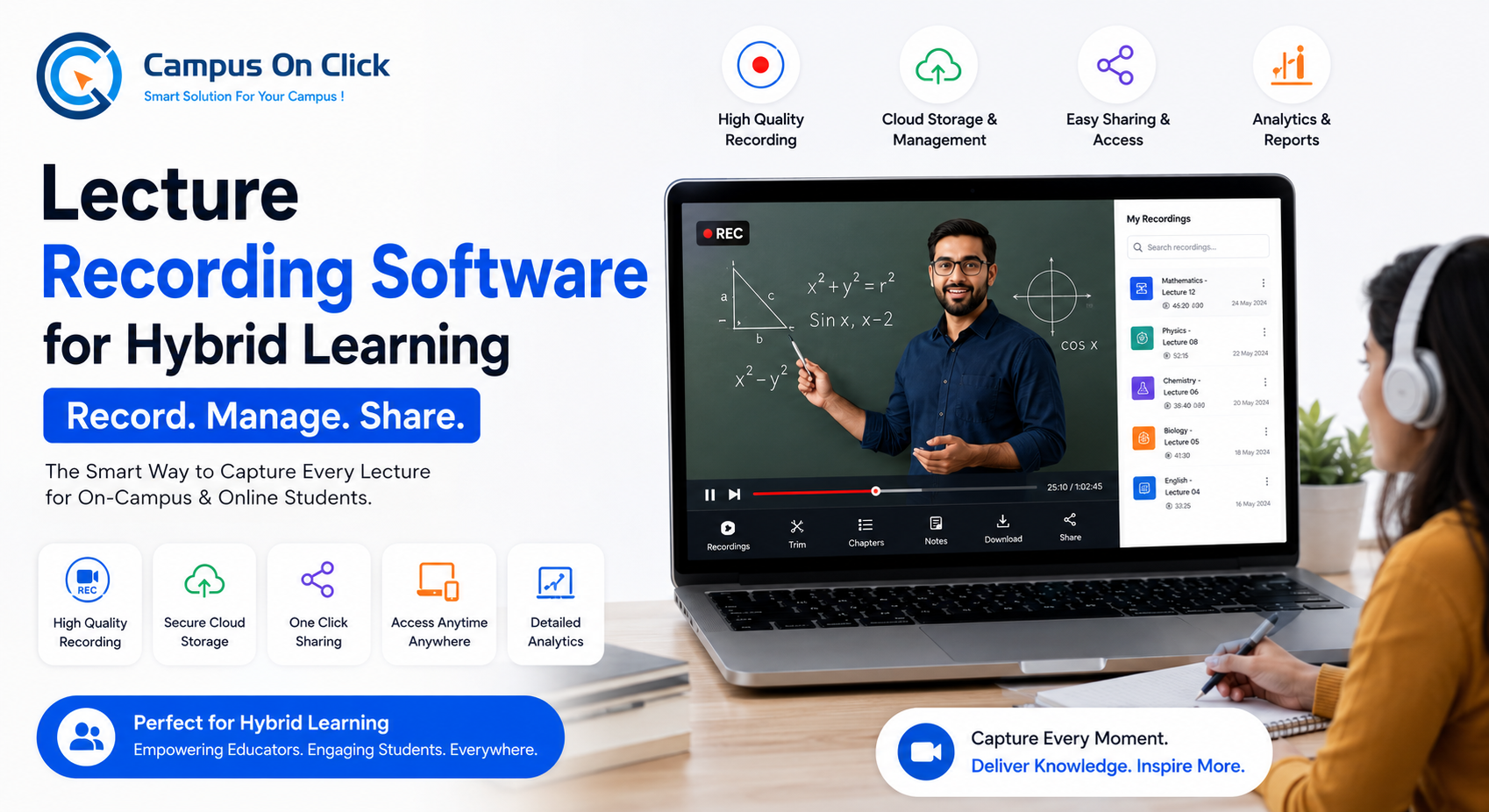
Why Every School and College Needs Lecture Recording Software for Hybrid Learning
Hybrid learning is no longer only an emergency backup for schools and colleges. It has become a practical way to support classroom teaching, online classes, revision sessions, guest lectures, remote learning, and academic continuity.
But live classes alone are not enough.
Students may miss a lecture because of internet issues, health problems, travel, timetable conflicts, exams, or personal reasons. Even students who attend live classes may need to revise important topics later.
That is why lecture recording software for hybrid learning is becoming essential for schools, colleges, coaching institutes, and universities.
A good lecture recording system allows institutes to record live lectures and make them available for students later. This helps students revise lessons, catch up on missed classes, prepare for exams, and continue learning beyond the live session.
For institutes using Vocal Meeting by Campus On Click, lecture recording becomes part of a complete education-focused live lecture workflow that includes scheduling, auto attendance, recordings, analytics, web portal, and mobile app access. The attached Vocal Meeting positioning highlights lecture recording as a key feature for helping students watch classes later for revision or missed lectures.
Quick Answer: Why Do Schools and Colleges Need Lecture Recording Software?
Schools and colleges need lecture recording software for hybrid learning because recorded lectures help students access missed classes, revise difficult topics, prepare for exams, and continue learning after the live class ends.
| Need | How Lecture Recording Helps |
|---|---|
| Missed classes | Students can watch lectures later |
| Revision | Students can replay important topics |
| Exam preparation | Recorded lessons support focused study |
| Hybrid learning | Works for both online and offline learning models |
| Teacher support | Reduces repeated explanations |
| Academic continuity | Learning continues beyond live sessions |
| Management visibility | Institutes can track lecture delivery and usage |
In simple words, lecture recording software makes live learning more flexible, reliable, and student-friendly.
What Is Lecture Recording Software?
Lecture recording software is a digital tool that records live classes, online lectures, seminars, training sessions, or academic discussions so they can be viewed later.
In an education setting, lecture recording software may support:
- Live class recording
- Video lecture storage
- Recorded lecture access for students
- Subject-wise or class-wise lecture organization
- Teacher-led lecture archives
- Revision support
- Missed class recovery
- Web and mobile viewing
- Analytics and reports
For hybrid learning, lecture recording software connects live teaching with on-demand learning.
This means students do not lose access to learning just because they missed the live class.
Why Hybrid Learning Needs Recorded Lectures
Hybrid learning combines offline classroom teaching with digital learning.
A school or college may use hybrid learning for:
- Regular online classes
- Offline classes supported by digital resources
- Revision lectures
- Guest lectures
- Doubt-solving sessions
- Exam preparation
- Remote learning days
- Weather or emergency closures
- Teacher training
- Parent or academic meetings
In all these cases, recorded lectures add long-term value.
The Main Problem with Live-Only Classes
Live classes happen at a fixed time. If a student misses that time, the learning opportunity may be lost.
This creates problems such as:
- Students falling behind
- Teachers repeating the same explanation
- Parents asking for missed class support
- Admin teams struggling to provide learning continuity
- Students depending on incomplete notes
- Exam preparation becoming harder
Recorded lectures solve this problem by making learning available after the live class.
Live Classes Only vs Live Classes with Recording
| Comparison Point | Live Classes Only | Live Classes with Recording |
|---|---|---|
| Student access | Only during the session | During and after the session |
| Missed lecture support | Limited | Strong |
| Revision value | Low | High |
| Exam preparation | Depends on notes | Students can replay lectures |
| Teacher workload | Repeated explanations may increase | Repetition can reduce |
| Learning continuity | Time-bound | More flexible |
| Hybrid learning readiness | Basic | Strong |
| Parent/student satisfaction | May vary | Usually better with access to recordings |
| Best use case | Real-time teaching only | Online, offline, and hybrid learning |
Live classes are important, but recorded lectures make them more useful.
Benefits of Lecture Recording Software for Students
Students are the biggest beneficiaries of lecture recording.
1. Students Can Rewatch Difficult Topics
Not every student understands a concept in one explanation.
Recorded lectures allow students to pause, replay, and revise difficult parts at their own pace.
This is especially useful for subjects such as:
- Mathematics
- Science
- Commerce
- Programming
- Engineering
- Competitive exam preparation
- Language learning
2. Students Can Catch Up on Missed Classes
Students may miss classes for genuine reasons.
Recorded lectures help them continue learning without depending only on classmates’ notes.
3. Better Exam Revision
Recorded classes for revision are extremely useful before exams.
Students can revisit important lectures, clarify concepts, and prepare more confidently.
4. Learning Becomes More Flexible
Hybrid learning works best when students can learn both live and later.
Lecture recordings give students more control over their study time.
Benefits of Lecture Recording Software for Teachers
Lecture recording does not only help students. It also supports teachers and faculty members.
1. Less Repetition
Teachers often repeat the same explanation for absent students.
With recorded lectures, students can watch missed sessions before asking follow-up questions.
2. Better Use of Class Time
When students revise recordings before class, teachers can use live sessions for discussion, doubt-solving, and deeper explanation.
3. Useful Teaching Resource Library
Over time, recorded lectures can become a digital academic content library.
Teachers can reuse important explanations, revision sessions, and guest lectures.
4. Support for Slow Learners
Some students need more time to understand concepts.
Recordings allow teachers to support them without slowing down the entire class.
Benefits for Schools
Schools need digital tools that are simple, structured, and useful for students, teachers, parents, and administrators.
Lecture recording software for schools helps with:
- Revision classes
- Missed lecture access
- Exam preparation
- Online learning days
- Hybrid learning support
- Parent satisfaction
- Teacher productivity
- Academic continuity
Example for Schools
A student misses a science lecture due to illness.
Without recording, the student depends on notes from classmates.
With lecture recording software, the student can watch the full lecture later, understand the topic, and return to class without falling behind.
This creates a better learning experience for both the student and the teacher.
Benefits for Colleges
Colleges usually have more complex academic structures than schools.
They may manage:
- Departments
- Courses
- Semesters
- Divisions
- Subjects
- Faculty members
- Guest lectures
- Seminars
- Placement training sessions
Lecture recording software for colleges helps students access academic content beyond live sessions.
Example for Colleges
A college conducts a guest lecture by an industry expert.
If the lecture is only live, only present students benefit.
If it is recorded, the college can share it with absent students, future batches, or department members for later learning.
This increases the long-term value of every session.
Benefits for Coaching Institutes
Coaching institutes depend heavily on repeat learning, revision, test discussions, and doubt-solving sessions.
Online lecture recording software helps coaching institutes:
- Record batch-wise lectures
- Provide missed lecture access
- Support exam preparation
- Share test discussion recordings
- Improve student accountability
- Build a digital revision library
For competitive exam coaching, recorded lectures can become a strong value-added service.
Benefits for Universities and Training Institutions
Universities and training organizations often conduct academic sessions at scale.
Lecture recording can support:
- Department lectures
- Faculty development programs
- Online seminars
- Orientation sessions
- Certification courses
- Remote learning programs
- Hybrid degree support
- Training workshops
A live lecture platform with recording helps institutions preserve academic knowledge and make it accessible to more learners.
Why Lecture Recording Matters in India
India’s online education sector continues to grow, and hybrid learning is becoming a practical model for schools, colleges, coaching institutes, and training organizations.
Technavio estimates India’s online education market will grow by about USD 7.40 billion from 2025 to 2030 at a CAGR of 23%. This growth is driven by factors such as skill development, employability, and increased digital learning adoption. (Technavio)
IMARC also reports that India’s online education market was valued at USD 3.64 billion in 2025 and is projected to reach USD 23.90 billion by 2034, supported by smartphone penetration, affordable internet, government-backed digital learning programs, and evolving EdTech platforms. (IMARC Group)
For Indian institutes, this means digital learning tools are no longer optional.
Schools and colleges need platforms that support:
- Live lectures
- Lecture recording
- Auto attendance
- Student access
- Mobile learning
- Academic reports
- Hybrid learning workflows
Lecture recording software helps institutes serve students better in this changing education environment.
What Features Should Lecture Recording Software Have?
Before choosing a platform, schools and colleges should check whether it supports the full academic workflow.
Lecture Recording Software Checklist
| Feature | Why It Matters |
|---|---|
| Live lecture recording | Records online classes for later viewing |
| Easy student access | Helps students watch missed classes |
| Web portal | Useful for administrators and teachers |
| Mobile app | Important for Indian students using smartphones |
| Lecture scheduling | Keeps classes organized |
| Auto attendance | Tracks student participation |
| Recording library | Helps organize recorded lectures |
| Analytics and reports | Gives management visibility |
| Class-wise or batch-wise access | Useful for schools and coaching institutes |
| Subject-wise organization | Useful for colleges |
| Simple interface | Reduces training needs |
| Secure access | Protects academic content |
The best platform should not only record videos. It should help institutes manage lectures, students, attendance, recordings, and reports in one system.
Generic Meeting Apps vs Education-Focused Lecture Recording Platforms
| Feature | Generic Meeting Apps | Education-Focused Platform |
|---|---|---|
| Basic video recording | Usually available | Available for academic use |
| Lecture scheduling | Manual or external | Built around academic workflows |
| Student attendance | Limited or manual | Auto attendance support |
| Recorded lecture organization | Often separate | Structured for classes, subjects, or batches |
| Admin visibility | Limited | Centralized reports and analytics |
| Student revision support | Not always organized | Designed for learning continuity |
| Mobile access | Usually available | Student-focused access |
| Best for | General meetings | Schools, colleges, coaching institutes, and universities |
Generic video tools can record meetings, but education-focused platforms make recordings more useful for academic management.
How to Use Recorded Lectures Effectively
Lecture recording software gives better results when institutes use it with a clear process.
Practical Tips for Schools and Colleges
- Record important lectures consistently
Focus on core subjects, revision classes, and difficult topics. - Organize recordings by class, subject, or batch
Students should not struggle to find the right lecture. - Use recordings for exam preparation
Create revision playlists before exams. - Track student access where possible
Analytics can help identify students who need support. - Inform students about recording availability
Make recorded lectures part of the learning routine. - Use live classes for interaction
Let recordings support revision, while live sessions focus on teaching and doubt-solving. - Review recordings for quality improvement
Academic heads can use recordings to improve teaching processes.
How Vocal Meeting by Campus On Click Supports Lecture Recording
Vocal Meeting by Campus On Click is an education-focused live lecture and video conferencing platform for schools, colleges, coaching institutes, universities, and training institutions.
It is designed for academic workflows rather than general office meetings.
Vocal Meeting helps institutes:
- Conduct live online lectures
- Schedule lectures in advance
- Track attendance automatically
- Record lectures for later viewing
- Support revision and missed classes
- Review analytics and reports
- Provide web portal and mobile app access
This makes Vocal Meeting useful for institutes that want to manage hybrid learning in a structured, measurable, and student-friendly way.
Conclusion
Lecture recording software for hybrid learning is essential for modern schools and colleges because it helps students access missed classes, revise important topics, and continue learning beyond the live session.
For teachers, it reduces repeated explanations.
For administrators, it improves academic visibility.
For students, it creates flexible learning access.
For management, it supports digital learning readiness.
As hybrid education grows in India, schools and colleges should choose platforms that combine live lectures, recordings, auto attendance, analytics, web access, and mobile access.
Vocal Meeting by Campus On Click helps educational institutes manage live lectures and recorded learning from one education-focused platform.
FAQ Section
What is lecture recording software for hybrid learning?
Lecture recording software for hybrid learning records live classes so students can watch missed lectures, revise lessons, and continue learning after the live session.
Why do schools need lecture recording software?
Schools need lecture recording software to support missed classes, revision, exam preparation, hybrid learning, and academic continuity.
Why do colleges need lecture recording software?
Colleges need lecture recording software to record lectures, seminars, guest sessions, placement training, and department-wise academic sessions for later access.
How do recorded lectures help students?
Recorded lectures help students rewatch difficult topics, catch up on missed classes, revise before exams, and learn at their own pace.
Are recorded lectures useful for exam preparation?
Yes. Recorded lectures are useful for exam preparation because students can replay important lessons, revise concepts, and review difficult topics.
What is the difference between live classes and recorded lectures?
Live classes happen in real time, while recorded lectures can be watched later. Hybrid learning works best when institutes use both.
Is lecture recording software useful for coaching institutes?
Yes. Coaching institutes can use lecture recording software for batch-wise lectures, test discussions, doubt sessions, and recorded revision classes.
Can students watch recorded lectures on mobile?
Yes, if the platform supports mobile app access. Mobile access is important for Indian students who use smartphones for online learning.
Does Vocal Meeting support lecture recording?
Yes. Vocal Meeting by Campus On Click supports lecture recording for later viewing, along with live lectures, scheduling, auto attendance, analytics, web portal, and mobile app access.
What features should lecture recording software have?
It should include live lecture recording, easy student access, lecture scheduling, auto attendance, analytics, reports, secure access, web portal, and mobile app support.